 Menu
Menu
Here Mark Rideout, a Microsoft developer explains how to create a progress bar column in a DataGridView, and provides a "bare-bone" code for DataGridViewProgressColumn class. His instructions on how to use it for databound datagridviews are:
If you are databound, then you can just change the column type of an integer column that has 0 through 100 values.
Some people, including myself do not understand what does it mean to "change the column type of an integer column that has 0 through 100 values" in the case with databound grid, and Mark seems to be too busy to answer. Does anyone know how it is done?
Here is a quick sample of my case:
namespace Sample
{
    public class Record
    {
        public int Id { get; set; }
        public string Name { get; set; }
        public int Progress { get; set; } // This is the int 0-100 field which
                                          // has data for a progress bar

        public Record()
        {
        }

        public Record(int id, string name, int progress)
        {
            this.Id = id;
            this.Name = name;
            this.Progress= progress;
        }
    }
}

namespace Sample
{
    public partial class SampleForm : Form
    {
        private BindingList<Record> records;

        public SampleForm()
        {
            InitializeComponent();
        }

        public SampleForm(BindingList<Record> records)
        {
            InitializeComponent();
            this.records = records;
        }

        private void SampleForm_Load(object sender, EventArgs e)
        {
            dataGridView1.DataSource = this.records;
        }
    }
}
At what point exactly should I change the "Progress" column type to DataGridViewProgressColumn, and how is that done?
 726
726
 asked Mar 22 '26 03:03
As I understand you need to bind such type of columns to the properties which have type Int32 and can have values from 0 to 100 (as percentage).
Data entry class:
class Data
{
    public int Progress { get; set; }
}
Binding of the data:
var data = new List<Data>() {
    new Data() { Progress = 50 },
    new Data() { Progress = 60 },
    new Data() { Progress = 30 },
    new Data() { Progress = 92 },
};

this.dataGridView1.DataSource = data;
** This is how it looks: **

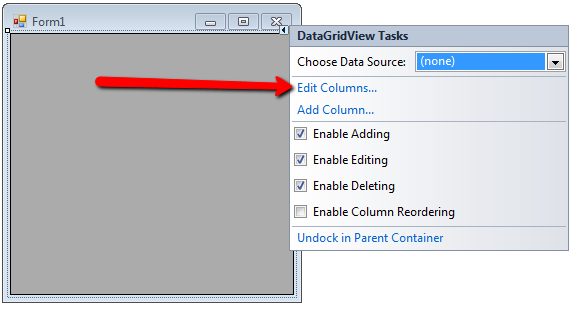
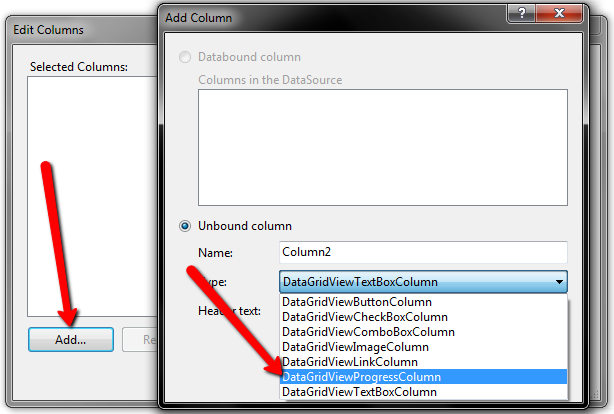
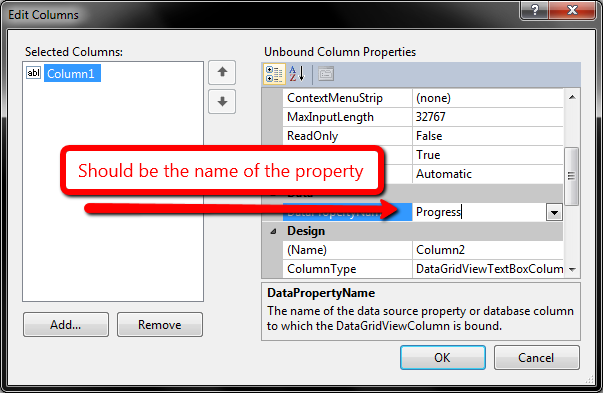
Class, described in the article should be added to the project a built before adding columns to GridView.
And don't forget that allowed values only from 0 to 100.
Steps
133
If you love us? You can donate to us via Paypal or buy me a coffee so we can maintain and grow! Thank you!
Donate Us With
