Menu
Menu
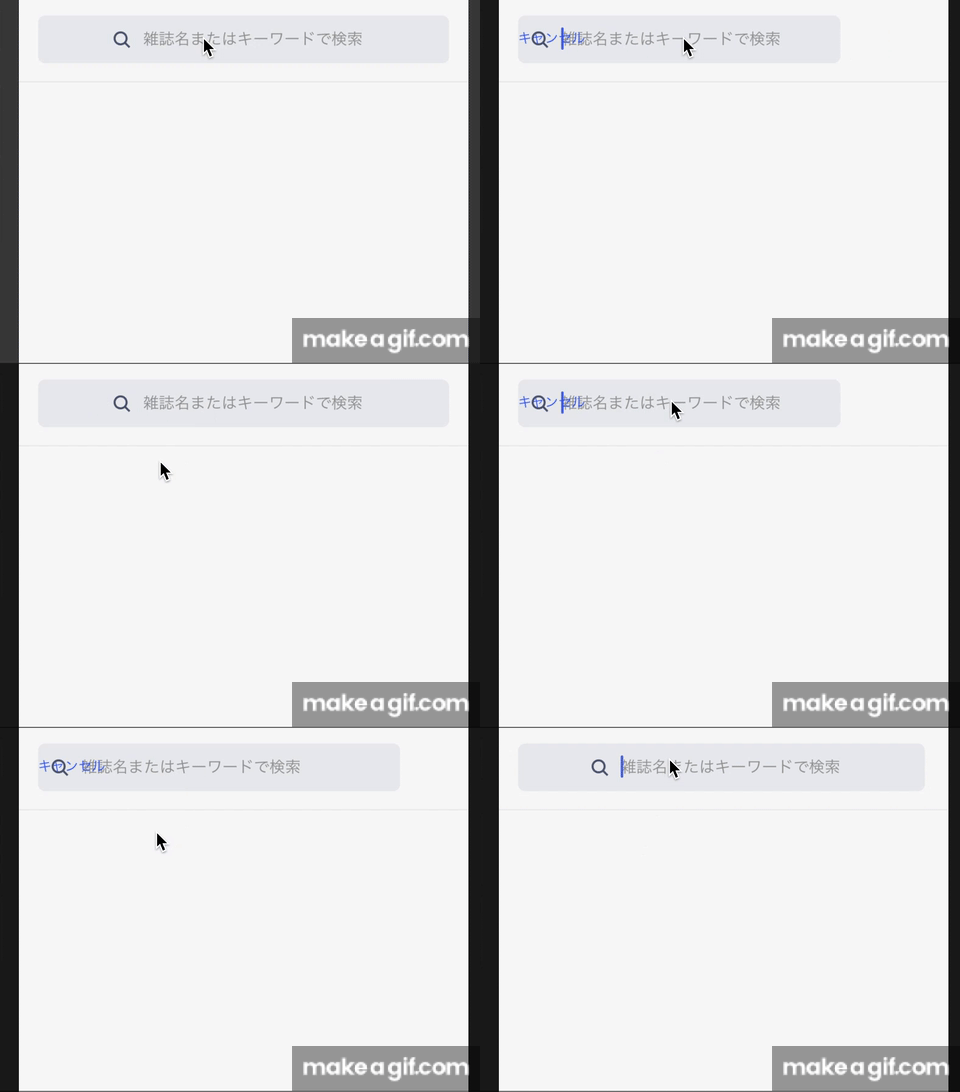
I want to show a cancel button, on the focus TextInput animation. I did the following code, but a cancel button does not display and follow the box when focused. It's only shown after the animation end.
And when cancel button displayed, it is not on the same line with textinput. How do I fix this?
const { width } = Dimensions.get('window');
const PADDING = 16;
const SEARCH_FULL_WIDTH = width - PADDING * 2;  //search_width when unfocused
const SEARCH_SHRINK_WIDTH = width - PADDING - 90;  //search_width when focused

class Search extends React.Component {

constructor(props: IProps) {
  super(props);
  this.state = {
    inputLength: new Animated.Value(SEARCH_FULL_WIDTH),
    searchBarFocused: false,
  }
}

private onFocus = () => {
  Animated.timing(this.state.inputLength, {
    toValue: SEARCH_SHRINK_WIDTH,
    duration: 250,
  }).start(() => this.setState({ searchBarFocused: true }));
}

private onBlur = () => {
  Animated.timing(this.state.inputLength, {
    toValue: SEARCH_FULL_WIDTH,
    duration: 250,
  }).start(() => this.setState({ searchBarFocused: false }));
}


<View style={styles.searchContainer}>
<Animated.View style={[
  styles.search,
  {
    width: this.state.inputLength,
    position: 'absolute',
    left: 16,
    alignSelf: 'center'
  },
  searchBarFocused === true ? undefined : { justifyContent: 'center' }
]}>
  <Image source={searchIcon} style={styles.image} />
  <TextInput
    style={styles.searchInput}
    ....
    onBlur={this.onBlur}
    onFocus={this.onFocus}
  />
</Animated.View>

{searchBarFocused &&
  <Touchable style={styles.cancelSearch} onPress={this.cancelSearch}>
    <Text style={styles.cancelSearchText}>Cancel</Text>
  </Touchable>
}
</View>

const styles = StyleSheet.create({
  searchContainer: {
    flexDirection: 'row',
    height: 72,
    borderBottomColor: SOLITUDE_COLOR,
  },
  search: {
    flex: 1,
    flexDirection: 'row',
    height: 40,
    borderRadius: 6,
  },
  cancelSearch: {
    marginHorizontal: 16,
    textAlign: 'center',
    justifyContent: 'center'
  }
});
gif: when unfocus and focused
 722
722
Here is a slightly modified version of your code.
import React from "react";
import {
  Dimensions,
  View,
  Animated,
  TextInput,
  TouchableOpacity,
  StyleSheet,
} from "react-native";

const { width } = Dimensions.get("window");
const PADDING = 16;
const SEARCH_FULL_WIDTH = width - PADDING * 2; //search_width when unfocused
const SEARCH_SHRINK_WIDTH = width - PADDING - 90; //search_width when focused

const AnimatedTouchable = Animated.createAnimatedComponent(TouchableOpacity);

export default class App extends React.Component {
  constructor(props) {
    super(props);
    this.state = {
      inputLength: new Animated.Value(SEARCH_FULL_WIDTH),
      cancelPosition: new Animated.Value(0),
      opacity: new Animated.Value(0),
      searchBarFocused: false
    };
  }

  onFocus = () => {
    Animated.parallel([
      Animated.timing(this.state.inputLength, {
        toValue: SEARCH_SHRINK_WIDTH,
        duration: 250
      }),
      Animated.timing(this.state.cancelPosition, {
        toValue: 16,
        duration: 400
      }),
      Animated.timing(this.state.opacity, {
        toValue: 1,
        duration: 250
      })
    ]).start();
  };

  onBlur = () => {
    Animated.parallel([
      Animated.timing(this.state.inputLength, {
        toValue: SEARCH_FULL_WIDTH,
        duration: 250
      }),
      Animated.timing(this.state.cancelPosition, {
        toValue: 0,
        duration: 250
      }),
      Animated.timing(this.state.opacity, {
        toValue: 0,
        duration: 250
      })
    ]).start();
  };

  render() {
    const { searchBarFocused } = this.state;

    return (
      <View style={styles.searchContainer}>
        <Animated.View
          style={[
            styles.search,
            {
              width: this.state.inputLength,
              position: "absolute",
              left: 16,
              alignSelf: "center"
            },
            searchBarFocused === true ? undefined : { justifyContent: "center" }
          ]}
        >
          <TextInput
            style={styles.searchInput}
            onBlur={this.onBlur}
            onFocus={this.onFocus}
            placeholder="Type something"
          />
        </Animated.View>

        <AnimatedTouchable
          style={[styles.cancelSearch, { right: this.state.cancelPosition }]}
          onPress={() => null}
        >
          <Animated.Text
            style={[styles.cancelSearchText, { opacity: this.state.opacity }]}
          >
            Cancel
          </Animated.Text>
        </AnimatedTouchable>
      </View>
    );
  }
}

const styles = StyleSheet.create({
  searchContainer: {
    flexDirection: "row",
    height: 72,
    borderBottomColor: "#00000033",
    paddingTop: 100
  },
  search: {
    flex: 1,
    flexDirection: "row",
    height: 40,
    borderRadius: 6,
    backgroundColor: "red"
  },
  cancelSearch: {
    position: "absolute",
    marginHorizontal: 16,
    textAlign: "center",
    justifyContent: "center",
    alignSelf: "center"
  }
});

59
If you love us? You can donate to us via Paypal or buy me a coffee so we can maintain and grow! Thank you!
Donate Us With