 Menu
Menu
I am using netbeans 7.0.1 to build a simple JFrame application
I am putting a textarea and a couple of buttons on using the gui builder
the buttons are on the same vertical level and the right hand button shifts right on resize of the window - that is fine but I would like the text area to do the same - i.e. resize to fit the relevant width of the window.
For the life of me I cannot see how this is done - I have looked around and I can find code for a hand coded app but not for netbeans gui builder
 833
833
 asked Dec 05 '25 01:12
Update: Ah sorry, didn't read the full question, you really want to do it with netbeans.. :) Well, well, now you have this post how to do it hand-crafted aswell! :)
I wouldn't use an GUI builder for this task. It is easy to create such layout with FlowLayout and BorderLayout:
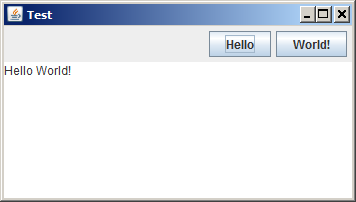
Screenshot was produced by this code:
public static void main(String... args) throws Exception {
    JFrame frame = new JFrame("Test");

    JPanel buttonPanel = new JPanel(new FlowLayout(FlowLayout.RIGHT));
    buttonPanel.add(new JButton("Hello"));
    buttonPanel.add(new JButton("World!"));

    frame.add(buttonPanel, BorderLayout.NORTH);
    frame.add(new JTextArea("Hello World!"), BorderLayout.CENTER);

    frame.setDefaultCloseOperation(JFrame.EXIT_ON_CLOSE);
    frame.setSize(600, 400);
    frame.setVisible(true);
}
It's all about the layout you're using. I would personally use GridBagLayout, probably because I am accustomed to it. Basically, you should follow these steps:
You can read more about GridBagLayout here: http://netbeans.org/kb/docs/java/gbcustomizer-basic.html
Learning GridBagLayout could take a couple of hours, getting used to it could take a couple of days, but it's worth learning. Just my 2 cents.
30
If you love us? You can donate to us via Paypal or buy me a coffee so we can maintain and grow! Thank you!
Donate Us With

