Menu
Menu
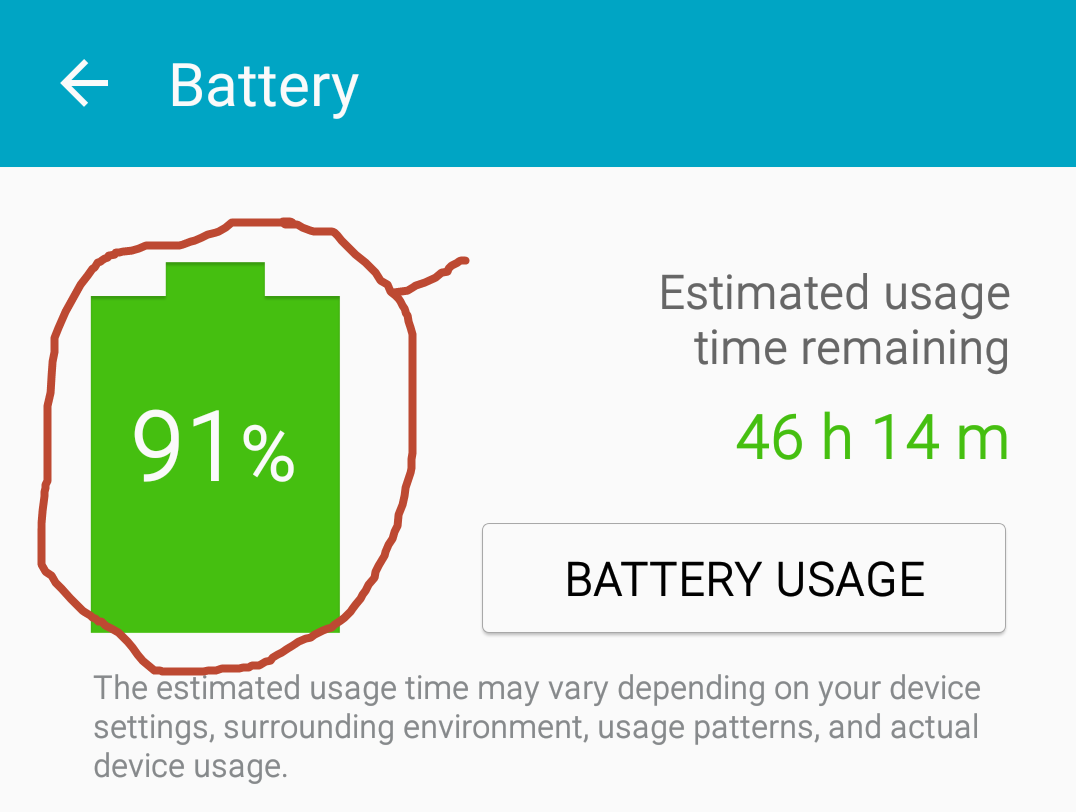
I want to create a battery level indicator as in the image(which i circled). The green part should fill based on the available battery in the device.
Getting the battery percentage from the device like this
registerReceiver(mBatInfoReceiver, new IntentFilter(
            Intent.ACTION_BATTERY_CHANGED));
So in the layout i am able to display the battery percentage.
public class BatteryIndicatorActivity extends Activity {
        //Create Broadcast Receiver Object along with class definition
    private BroadcastReceiver mBatInfoReceiver = new BroadcastReceiver() {
        @Override
          //When Event is published, onReceive method is called
        public void onReceive(Context c, Intent i) {
              //Get Battery %
            int level = i.getIntExtra("level", 0);
            TextView tv = (TextView) findViewById(R.id.textfield);
              //Set TextView with text
            tv.setText("Battery Level: " + Integer.toString(level) + "%");
        }

    };
But how to create a UI for this type of battery indicator. Is their any api to achieve this?, If not how to create such type of UI.
Your help will be appreciated.
 771
771
Here is my CustomView for display battery level
class BatteryView @JvmOverloads constructor(context: Context, attrs: AttributeSet? = null, defStyleAttr: Int = 0) :
    View(context, attrs, defStyleAttr) {
    private var radius: Float = 0f
    private var isCharging: Boolean = false

    // Top
    private var topPaint =
        PaintDrawable(Color.WHITE) // I only want to corner top-left and top-right so I use PaintDrawable instead of Paint
    private var topRect = Rect()
    private var topPaintWidthPercent = 50
    private var topPaintHeightPercent = 8

    // Border
    private var borderPaint = Paint().apply {
        color = Color.BLUE
        style = Paint.Style.STROKE
    }
    private var borderRect = RectF()
    private var borderStrokeWidthPercent = 8
    private var borderStroke: Float = 0f

    // Percent
    private var percentPaint = Paint()
    private var percentRect = RectF()
    private var percentRectTopMin = 0f
    private var percent: Int = 0

    // Charging
    private var chargingRect = RectF()
    private var chargingBitmap: Bitmap? = null

    init {
        init(attrs)
        chargingBitmap = getBitmap(R.drawable.ic_charging)
    }

    private fun init(attrs: AttributeSet?) {
        val ta = context.obtainStyledAttributes(attrs, R.styleable.BatteryView)
        try {
            percent = ta.getInt(R.styleable.BatteryView_bv_percent, 0)
            isCharging = ta.getBoolean(R.styleable.BatteryView_bv_charging, false)
        } finally {
            ta.recycle()
        }
    }

    @SuppressLint("DrawAllocation")
    override fun onMeasure(widthMeasureSpec: Int, heightMeasureSpec: Int) {
        val measureWidth = View.getDefaultSize(suggestedMinimumWidth, widthMeasureSpec)
        val measureHeight = (measureWidth * 1.8f).toInt()
        setMeasuredDimension(measureWidth, measureHeight)

        radius = borderStroke / 2
        borderStroke = (borderStrokeWidthPercent * measureWidth).toFloat() / 100

        // Top
        val topLeft = measureWidth * ((100 - topPaintWidthPercent) / 2) / 100
        val topRight = measureWidth - topLeft
        val topBottom = topPaintHeightPercent * measureHeight / 100
        topRect = Rect(topLeft, 0, topRight, topBottom)

        // Border
        val borderLeft = borderStroke / 2
        val borderTop = topBottom.toFloat() + borderStroke / 2
        val borderRight = measureWidth - borderStroke / 2
        val borderBottom = measureHeight - borderStroke / 2
        borderRect = RectF(borderLeft, borderTop, borderRight, borderBottom)

        // Progress
        val progressLeft = borderStroke
        percentRectTopMin = topBottom + borderStroke
        val progressRight = measureWidth - borderStroke
        val progressBottom = measureHeight - borderStroke
        percentRect = RectF(progressLeft, percentRectTopMin, progressRight, progressBottom)

        // Charging Image
        val chargingLeft = borderStroke
        var chargingTop = topBottom + borderStroke
        val chargingRight = measureWidth - borderStroke
        var chargingBottom = measureHeight - borderStroke
        val diff = ((chargingBottom - chargingTop) - (chargingRight - chargingLeft))
        chargingTop += diff / 2
        chargingBottom -= diff / 2
        chargingRect = RectF(chargingLeft, chargingTop, chargingRight, chargingBottom)
    }

    override fun onDraw(canvas: Canvas) {
        drawTop(canvas)
        drawBody(canvas)
        if (!isCharging) {
            drawProgress(canvas, percent)
        } else {
            drawCharging(canvas)
        }
    }

    private fun drawTop(canvas: Canvas) {
        topPaint.bounds = topRect
        topPaint.setCornerRadii(floatArrayOf(radius, radius, radius, radius, 0f, 0f, 0f, 0f))
        topPaint.draw(canvas)
    }

    private fun drawBody(canvas: Canvas) {
        borderPaint.strokeWidth = borderStroke
        canvas.drawRoundRect(borderRect, radius, radius, borderPaint)
    }

    private fun drawProgress(canvas: Canvas, percent: Int) {
        percentPaint.color = getPercentColor(percent)
        percentRect.top = percentRectTopMin + (percentRect.bottom - percentRectTopMin) * (100 - percent) / 100
        canvas.drawRect(percentRect, percentPaint)
    }

    // todo change color
    private fun getPercentColor(percent: Int): Int {
        if (percent > 50) {
            return Color.WHITE
        }
        if (percent > 30) {
            return Color.YELLOW
        }
        return Color.RED
    }

    private fun drawCharging(canvas: Canvas) {
        chargingBitmap?.let {
            canvas.drawBitmap(it, null, chargingRect, null)
        }
    }

    private fun getBitmap(drawableId: Int, desireWidth: Int? = null, desireHeight: Int? = null): Bitmap? {
        val drawable = AppCompatResources.getDrawable(context, drawableId) ?: return null
        val bitmap = Bitmap.createBitmap(
            desireWidth ?: drawable.intrinsicWidth,
            desireHeight ?: drawable.intrinsicHeight,
            Bitmap.Config.ARGB_8888
        )
        val canvas = Canvas(bitmap)
        drawable.setBounds(0, 0, canvas.width, canvas.height)
        drawable.draw(canvas)
        return bitmap
    }

    fun charge() {
        isCharging = true
        invalidate() // can improve by invalidate(Rect)
    }

    fun unCharge() {
        isCharging = false
        invalidate()
    }

    fun setPercent(percent: Int) {
        if (percent > 100 || percent < 0) {
            return
        }
        this.percent = percent
        invalidate()
    }

    fun getPercent(): Int {
        return percent
    }
}
style.xml
<declare-styleable name="BatteryView">
    <attr name="bv_charging" format="boolean" />
    <attr name="bv_percent" format="integer" />
</declare-styleable>
drawable/ic_charging.xml
<vector xmlns:android="http://schemas.android.com/apk/res/android"
    android:width="24dp"
    android:height="24dp"
    android:viewportWidth="368.492"
    android:viewportHeight="368.492">
    <path
        android:fillColor="#FFFFFF"
        android:pathData="M297.51,150.349c-1.411,-2.146 -3.987,-3.197 -6.497,-2.633l-73.288,16.498L240.039,7.012c0.39,-2.792 -1.159,-5.498 -3.766,-6.554c-2.611,-1.069 -5.62,-0.216 -7.283,2.054L71.166,217.723c-1.489,2.035 -1.588,4.773 -0.246,6.911c1.339,2.132 3.825,3.237 6.332,2.774l79.594,-14.813l-23.257,148.799c-0.436,2.798 1.096,5.536 3.714,6.629c0.769,0.312 1.562,0.469 2.357,0.469c1.918,0 3.78,-0.901 4.966,-2.517l152.692,-208.621C298.843,155.279 298.916,152.496 297.51,150.349z" />
</vector>
Using
<package.BatteryView
        android:id="@+id/battery_view"
        android:layout_width="150dp"
        android:layout_height="wrap_content"
        android:src="@drawable/ic_charging"
        app:bv_charging="false"
        app:bv_percent="20" />


Github project
Hope it help
167
There are a lot of ways to do it. Here are few of them:
ProgressBar, make it vertical, make it be drawn in the battery shapeView, override onDraw() in it, and draw the battery shape on the canvas
37
If you love us? You can donate to us via Paypal or buy me a coffee so we can maintain and grow! Thank you!
Donate Us With