Menu
Menu
I am using NavigationComponent on my App.
I have an specific flow where after a click on a button of BottomSheetDialogFragment the app should navigate to another fragment. But when that Fragment is popped I need to navigate back to the previous BottomSheetDialogFragment.
For some reason the BottomSheetDialogFragment is being dismissed automatically.
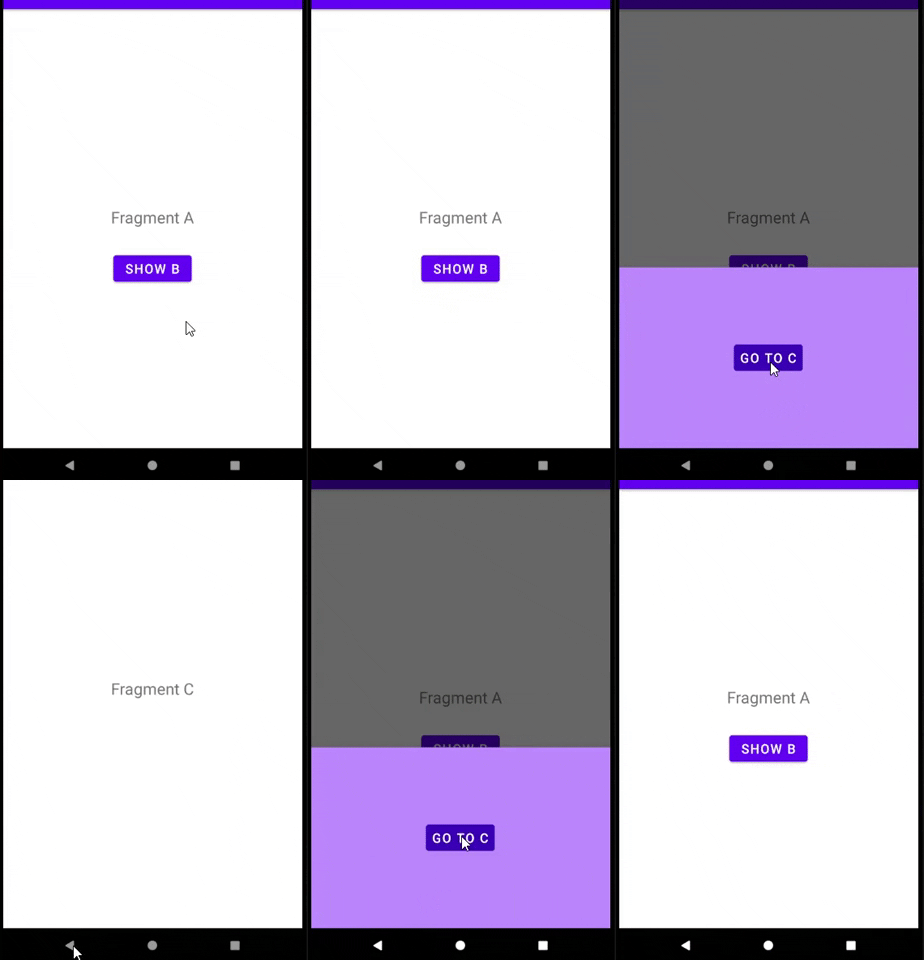
Frag A : click on a button
Frag A -> Dialog B : click on a button
Frag A -> Dialog B -> Frag C : pop Frag C from the stack
Frag A : Dialog B was automatically dismissed =;/
How can one prevent that dismissing?
Q: Why do I need the BottomSheetDialogFragment not dismissed?
A: I listen to the result of the opened fragment through a LiveData. Due to the dismissing of the BottomSheetDialogFragment it never receives the result.
 890
890
This is not possible. Dialog destinations implement the FloatingWindow interface which states:
Destinations that implement this interface will automatically be popped off the back stack when you navigate to a new destination.
So it is expected that dialog destinations are automatically popped off the back stack when you navigate to a <fragment> destination. This is not the case when navigating between multiple dialog destinations (those can be stacked on top of one another).
This issue explains a bit more about the limitations here, namely that:
Dialogs are separate windows that always sit above your activity's window. This means that the dialog will continue to intercept the system back button no matter what state the underlying FragmentManager is in or what FragmentTransactions you do.
Operations on the fragment container (i.e., your normal destinations) don't affect dialog fragments. Same if you do FragmentTransactions on a nested FragmentManager.
So once you navigate to your <fragment> destination, the only way for the system back button to actually work is for all floating windows to be popped (otherwise they would intercept the back button before anything else) as those windows are always floating above the content.
This isn't a limitation imposed by the Navigation Component - the same issues apply to any usages of BottomSheetDialogFragment regarding the Fragment back stack and the system back button.
89
This is not possible as pointed out by @ianhanniballake.
But this can be achieved by making fragment C as a DailogFragment, not a normal Fragment, but this requires some effort to make it behave like a normal fragment.
In this case both B & C are dialogs and therefore they'll share the same back stack. and hence when the back stack is poped up to back from C to B, you'll still see the BottomSheetDialgFragment B showing.
To fix the limited window of C use the below theme:
<style name="DialogTheme" parent="Theme.MyApp">
    <item name="android:windowNoTitle">true</item>
    <item name="android:windowFullscreen">false</item>
    <item name="android:windowIsFloating">false</item>
</style>
Where Theme.MyApp is your app's theme.
And then apply it to C by overriding getTheme():
class FragmentC : DialogFragment() {

    //.....

    override fun getTheme(): Int = R.style.DialogTheme

}
Also you need to change C in the navigation graph from a fragment to a dialog:
<dialog
        android:id="@+id/fragmentC"
        android:name="....">
</dialog>
Preview:
44
If you love us? You can donate to us via Paypal or buy me a coffee so we can maintain and grow! Thank you!
Donate Us With