 Menu
Menu
I am using ttk for Notebook, I am try to change the frame of the notebook to flat relief but there are not many helpful sources
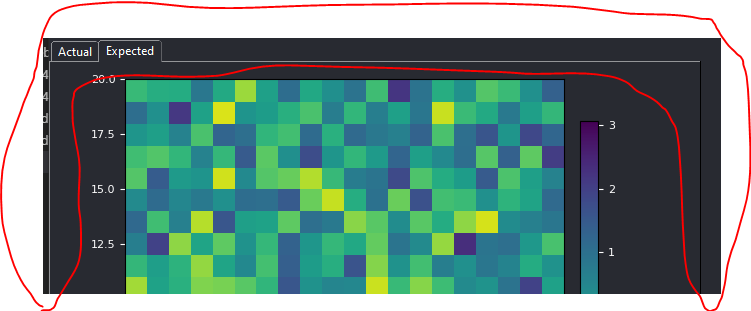
Having looked around, I know that ttk is very style dependent so I have created a new style, but so far can only change a few elements since I cannot find the exact element names that I want to change. That includes the relief of the Notebook frame.
    style = ttk.Style()
    style.theme_create(
        "name", parent="alt", settings = {
            ".": {"configure": {"background": BG_COLOUR,
                                "foreground": "white",
                                "relief": "flat"}},
            "TLabel": {"configure": {"foreground": "white",
                       "padding": 10,
                       "font": ("Calibri", 16)}},
            "TNotebook": {"configure": {"tabmargins": [2, 5, 2, 0]}
                         },
            "TNotebook.Tab": {
                "configure": {"relief" : "flat",
                              "bordercolor" : BG_COLOUR,
                              "darkcolor" : BG_COLOUR,
                              "lightcolor" : BG_COLOUR,
                              "padding": [5, 1], "background": BG_COLOUR
                             },
                "map": {"background": [("selected", BG_COLOUR)],
                        "expand": [("selected", [1, 1, 1, 0])]}
            }
        })

    style.theme_use("name")
You might see that I'm following the style of Visual studio code, so first is to make that frame to flat, then expand the tabs, so far ttk is giving me a difficult time
 519
519
 asked Dec 06 '25 05:12
This is quite the old question, but I wondered the same and seem to have found the answer, so I might as well post it still. Use "borderwidth", not "relief".
With the attribute "borderwidth" you can set the thickness of the border. Just set it to zero and the relief disappears.
You can set it for the notebook, in order to make the border disappear for the page.
"TNotebook": {
              "configure": {"tabmargins": [2, 5, 2, 0]},
              "borderwidth": 0
             }
Examples from my program:
Normal (with borders/relief):

With flat border for the page:

You can also set it for the notebook tabs to make the border disappear for them:
"TNotebook.Tab": {
                  "configure": {
                                "borderwidth": 0,
                                "bordercolor" : BG_COLOUR,
                                "darkcolor" : BG_COLOUR,
                                "lightcolor" : BG_COLOUR,
                                "padding": [5, 1], "background": BG_COLOUR
                                }
                  }
Both borders set to zero:

I only tested this on Windows, I don't know if there are differences for Mac or Linux.
135
answered Dec 08 '25 18:12
If you love us? You can donate to us via Paypal or buy me a coffee so we can maintain and grow! Thank you!
Donate Us With