 Menu
Menu
I am trying to convert a session into a specific (date) string.<cfset Purchasedate = "#session.checkout.vehicle.purchasedate#" />.
This date field has a mask that will always make the date have this format 02/05/2015.
I am trying to take this date and create an array to look like this:
ARRAY
[1] 02
[2] 05
[3] 2015
Is there maybe a RegEx that will help me create this by selecting the first two numbers to the first array then the second two numbers to the second array and the last four numbers to the third array?
That way I can create multiple variables.
<cfset Purchasedate = "02/05/2015" />
<cfset PurchArray = ReMatch("\2d,\2d,\4d",Purchasedate) />
<cfdump var="#PurchArray#">
This regEx clearly is not working \2d,\2d,\4d so any help with this would be greatly appreciated!
 695
695
You don't need regex. This will give you what you say you want.
writedump(listtoarray("02/05/2015", "/"));
However, if session.checkout.vehicle.purchasedate is a date object, you would use date functions year(), month(), and day().
84
The regex should be (\d{2})\/(\d{2})\/(\d{4}). Escaping the backslashes might be optional.
\d matches a single digit.
{x} matches exactly x number of the previous thing (in the above case, a digit).
The () parentheses are capturing groups, allowing you to refer to pieces of the whole match.
Similarly, you could do \d\d\/\d\d\/\d\d\d\d or [0-9]{2}\/[0-9]{2}\/[0-9]{4}, they will all accomplish the same thing.
(\d{2})\/(\d{2})\/(\d{4})
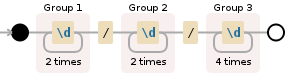
Debuggex Demo
This regex is sound, but it won't return the captured groups in an array like you want. This is because ReMatch doesn't do that. See this answer which explains why, and a few ways to work around it.
31
If you love us? You can donate to us via Paypal or buy me a coffee so we can maintain and grow! Thank you!
Donate Us With

